Settle in
The details guests look for as they put down their bags.
- Directions, parking and arrival instructions
- Wi-Fi, reception hours and team contact details
- Safety instructions and useful phone numbers
The hospitality journal
You have just welcomed your guests. Give them a little guidance for what comes next: breakfast hours, a favourite local spot, the right person to call. A digital booklet, one scan away.
Free · No credit card · No app for your guests

The welcome starts at reception. The care continues throughout the stay.
01 / From the guest’s side
When does breakfast finish? Where can we park tonight? A hotel welcome booklet brings together the small details that help guests settle in, without searching through messages sent before arrival.
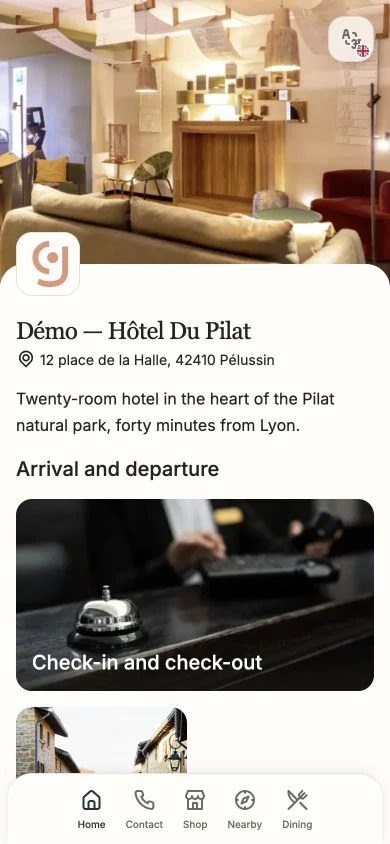
See the current guest guide interface for our demonstration hotel. Open it from this preview to explore its sections as a guest would on their phone.
The booklet provides information. Your team provides the welcome.
Explore what the digital guest guide can do02 / The content
Start with the questions guests actually ask. Use this checklist as a starting point for your hotel, holiday rental or B&B.
The details guests look for as they put down their bags.
Your services and favourite places deserve to be discovered.
One last thoughtful touch to remove uncertainty.
A useful rule: short sections, clear labels and contact details that are easy to find.
03 / Choosing a format
A printed welcome note still belongs in a guest room. For practical information, choose a format that is easy to read and keep up to date.
| Day to day | Paper | QR guest guide | |
|---|---|---|---|
| An opening time changes | Edit and reprint | Update the shared file | Edit the content, keep the same QR code |
| A guest needs information | Read the booklet in the room | Open the file, zoom if needed | Scan or open the link on mobile |
| You share the booklet | Leave a copy in the room | Send a link or an attachment | Place the QR in the room, send the link before arrival |
| You improve the content | Listen to guest feedback | Listen to guest feedback | Combine feedback with guide usage statistics |
A hotelier’s experience

« We implemented guideyourguest to digitize our welcome booklet for Green Key goals and improve our CSR practices. »
04 / Getting started
Publish the essentials first. Add services and local recommendations as you learn from your guests’ feedback.
Bring together your hours, directions, Wi-Fi and contacts. Arrange them in short sections.
Open the booklet and check the details as a guest who has just arrived would.
Print the QR code for the room and add the link to your arrival message. Future edits will keep the same access point.
The booklet is a first step. Find useful resources for the rest of your guests’ journey.